
The transformative power of digital signatures is reshaping business operations for IT managers and operations teams worldwide. With the increasing pressure to optimize workflow efficiency, the integration of digital signatures has become a critical component in modernizing document management processes. As we step into 2026, understanding the nuances of this technology is key to gaining a competitive edge. This comprehensive guide provides IT managers and operations teams with the tools, insights, and strategies needed to leverage digital signatures effectively.
The Current Landscape of Digital Signatures
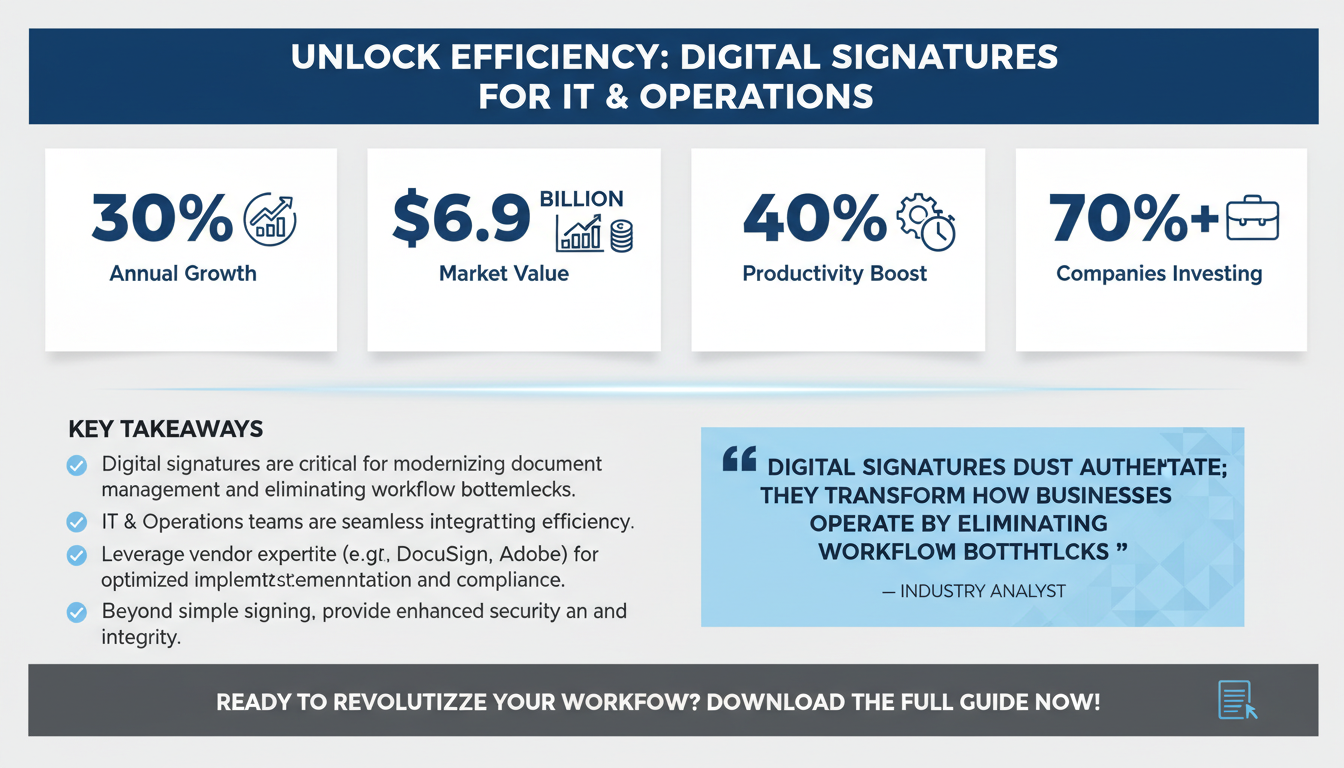
Over the past decade, digital signatures have evolved from a niche technology to a mainstream necessity. According to a recent Gartner report, the use of digital signatures is expected to grow by 30% annually, driven by the demand for secure and efficient document processing. This growth is largely attributed to the rising need for compliance, security, and operational efficiency, especially in industries like finance, healthcare, and legal. In fact, the global market for digital signatures is projected to reach $6.9 billion by 2026, reflecting its critical importance across diverse sectors.
In a study by Forrester Research, organizations reported a 40% increase in productivity after implementing digital signature solutions. The report highlights that the reduction in processing times and errors, along with enhanced security, are significant contributors to this productivity boost. Digital signatures are not just about legality and authentication; they are about transforming how businesses operate by eliminating bottlenecks in document workflows.
IT managers and operations teams are uniquely positioned to spearhead the adoption of digital signatures within their organizations. Their role involves not only understanding the technological aspects but also ensuring seamless integration with existing systems to maximize efficiency. For example, companies like Adobe and DocuSign have been pivotal in providing robust digital signature solutions that integrate with major enterprise systems, ensuring smoother transitions and enhanced usability.

Market Growth and Adoption
The rapid adoption of digital signatures is also driven by the increasing digitization of business processes. As more organizations adopt remote work policies and virtual transactions, the need for secure and efficient digital solutions becomes paramount. According to a survey by IDC, over 70% of companies are planning to increase their investment in digital tools, including digital signatures, as part of their digital transformation strategies. This trend highlights the growing recognition of digital signatures as not just a technological tool but a strategic business enabler.
Pro Tip: Leveraging Vendor Expertise
When implementing digital signatures, it's beneficial to leverage the expertise of vendor partners. Companies like DocuSign and Adobe offer not only software solutions but also consulting services to help tailor digital signature implementations to specific business needs. Engaging with these experts can ensure that the solution is optimized for maximum efficiency and compliance, providing long-term value.
Understanding the Benefits of Digital Signatures
Digital signatures offer a plethora of benefits that extend beyond simple document signing. At the core, they provide enhanced security, ensuring that documents are tamper-proof and verified. This is especially crucial in sectors that handle sensitive information, such as healthcare and finance. The encryption technologies used in digital signatures ensure that each signed document is unique and cannot be altered, thus maintaining the integrity of critical business communications.
According to McKinsey & Company, organizations leveraging digital signatures can achieve up to a 50% reduction in document turnaround times. This reduction is largely due to the elimination of manual processes and the ability to sign documents from anywhere, at any time. Such flexibility not only speeds up workflows but also significantly enhances employee productivity and satisfaction. Moreover, the environmental impact of reduced paper usage is considerable, aligning with global sustainability goals.
Furthermore, digital signatures contribute to cost savings by reducing the need for physical paper, printing, and storage. A study by Statista shows that companies can save up to 80% on document-related costs by going paperless. This not only benefits the bottom line but also aligns with sustainability goals, making digital signatures a win-win for modern businesses. Businesses like Xerox and HP have reported significant reductions in operational costs by transitioning to digital documentation processes.
For IT managers and operations teams, understanding these benefits is crucial for advocating digital signature adoption within their organizations, ensuring both efficiency and compliance are prioritized. It is also essential to regularly review the digital signature solutions to ensure they are up-to-date with the latest compliance standards and technological advancements.

Environmental Impact and Sustainability
In addition to cost savings, digital signatures support environmental sustainability by significantly reducing paper waste. The World Wildlife Fund estimates that the average office worker uses about 10,000 sheets of paper annually. Transitioning to digital signatures can drastically cut this number, contributing to efforts to preserve forests and reduce carbon footprints. Many companies now include digital signature adoption as part of their corporate social responsibility (CSR) initiatives, aiming to achieve a paperless office environment.
Expert Insight: Compliance as a Catalyst for Adoption
Compliance with industry regulations is often a driving factor for adopting digital signatures. As regulatory bodies continue to enforce stricter data protection and electronic transaction standards, organizations that implement compliant digital signature solutions can not only avoid penalties but also gain a competitive advantage. Legal expert Sarah Thompson notes that being proactive about compliance can open new business opportunities, particularly in international markets where digital transaction standards are becoming more harmonized.
Implementing Digital Signatures: A Step-by-Step Guide
Implementing digital signatures within an organization requires a strategic approach to ensure seamless integration and adoption. The first step is to assess the current document workflows and identify areas where digital signatures can provide the most significant impact. This involves mapping out existing processes and pinpointing bottlenecks where digital signatures could streamline operations.
Next, it's essential to choose a digital signature solution that aligns with your organization's specific needs. Consider factors such as compliance requirements, integration capabilities, and user-friendliness. Engaging with vendors and conducting trials can help in making an informed decision. Popular solutions such as DocuSign, Adobe Sign, and HelloSign offer different features that can be tailored to specific business environments.
Once a solution is selected, the implementation process involves configuring the software to integrate with existing systems. This may include setting up APIs or using pre-built connectors for popular platforms such as Microsoft 365 or Google Workspace. Training is also a critical component, ensuring that all users are comfortable with the new system and understand its benefits. Providing comprehensive training sessions and resources can significantly ease the transition process.
Finally, it's essential to monitor the impact of digital signatures on workflow efficiency continuously. Gathering feedback and making adjustments as needed will ensure the system remains effective and aligned with organizational goals. Regular feedback loops can help identify areas for improvement and ensure that the digital signature solution evolves with the needs of the business.

Checklist: Key Steps for Implementation
- Conduct a comprehensive workflow analysis to identify key areas for improvement.
- Select a digital signature solution that meets compliance and business needs.
- Ensure seamless integration with existing IT systems and platforms.
- Provide extensive training and support to all users involved in the process.
- Establish feedback loops to continuously assess and optimize the solution.
Pro Tip: Leveraging Pilot Programs
Before a full-scale rollout, consider starting with a pilot program to test digital signature integration in a controlled environment. This approach allows you to identify potential challenges and gather initial feedback without disrupting broader operations. A successful pilot can build confidence among stakeholders and provide valuable insights for refining the implementation strategy.
Overcoming Common Challenges in Digital Signature Adoption
While the benefits of digital signatures are clear, organizations often face challenges during adoption. One common issue is resistance to change, particularly among employees accustomed to traditional processes. Addressing this requires effective change management strategies, including clear communication of the benefits and providing comprehensive training. Change management frameworks such as ADKAR can be instrumental in facilitating smooth transitions.
Another challenge is ensuring compliance with industry-specific regulations. Digital signatures must meet legal standards to be considered valid, which can vary by jurisdiction. Working closely with legal teams and choosing a solution that complies with standards such as eIDAS or UETA can mitigate compliance risks. For instance, the healthcare industry must adhere to HIPAA standards, necessitating additional measures for data protection.
Technical challenges can also arise, particularly with integrating digital signature solutions into existing IT infrastructures. Ensuring compatibility and addressing potential security concerns are critical to overcoming these hurdles. Regular audits and updates can help maintain system integrity and security. Businesses should also plan for potential scalability issues as digital signature adoption grows.
By anticipating these challenges and implementing proactive measures, IT managers and operations teams can ensure a smooth transition to digital signatures, maximizing their benefits. Collaborating with stakeholders across different departments can also facilitate better integration and acceptance of digital signature solutions.

Checklist: Strategies for Overcoming Adoption Challenges
- Develop a comprehensive change management plan to address resistance.
- Ensure legal and regulatory compliance with the chosen solution.
- Address technical compatibility and security concerns early in the process.
- Plan for scalability to accommodate future growth.
- Engage stakeholders across departments for a collaborative approach.
Maximizing Efficiency with Digital Signature Integrations
One of the most significant advantages of digital signatures is their ability to integrate with various business applications, enhancing overall workflow efficiency. Integrations with CRM systems, document management platforms, and workflow automation tools can streamline processes and reduce manual intervention. These integrations allow for seamless data exchange and process automation, reducing the likelihood of errors and delays.
For instance, integrating digital signatures with a CRM system like Salesforce can automate the contract signing process, ensuring that sales agreements are executed quickly and accurately. This integration can be further enhanced with workflow automation platforms such as Apparatuz, which automates repetitive tasks and improves data accuracy. Companies like Salesforce and HubSpot have demonstrated how such integrations can lead to significant efficiency improvements and enhanced customer satisfaction.
Moreover, digital signatures can be embedded into email platforms, allowing documents to be signed directly from email interfaces. This reduces the need for additional software and simplifies the signing process for end-users. Google Workspace and Microsoft Outlook are examples of platforms that support such integrations, making it easier for users to incorporate digital signatures into their daily routines.
By leveraging these integrations, IT managers and operations teams can create a more cohesive and efficient digital environment, where digital signatures become a natural part of everyday workflows. Regularly reviewing and optimizing these integrations can further enhance workflow efficiency and ensure that the organization remains agile and responsive to changing business needs.

Expert Insight: Customizing Integrations for Maximum Impact
Customization is key when integrating digital signatures with existing systems. Tailoring integrations to align with specific business processes can maximize their impact. IT managers should work closely with vendors to explore customization options, ensuring that the digital signature solution fits seamlessly within the organization's unique workflow architecture.
Ensuring Security and Compliance with Digital Signatures
Security and compliance are paramount when implementing digital signatures, especially given the sensitive nature of many documents. Digital signatures use encryption and authentication mechanisms to ensure the integrity and authenticity of signed documents. These security measures prevent unauthorized access and alterations, maintaining the confidentiality and integrity of business documents.
According to a study by IBM, digital signatures can reduce the risk of document tampering by over 90%. This is achieved through advanced encryption algorithms and secure key management practices. By employing public key infrastructure (PKI) technology, digital signatures authenticate the signer's identity, providing assurance of document authenticity.
Compliance with legal standards is also critical. Choosing a solution that adheres to global regulations, such as the EU's eIDAS or the U.S.'s ESIGN Act, ensures that digital signatures are recognized as legally binding. Regular audits and updates to the digital signature infrastructure can further enhance compliance and security. Engaging with legal experts to understand jurisdiction-specific requirements can help mitigate potential legal risks.
By prioritizing security and compliance, IT managers and operations teams can protect their organizations from potential legal and financial risks associated with document management. Implementing continuous monitoring and incident response strategies can further bolster security and ensure quick resolutions to any issues that arise.
Pro Tip: Implementing Multi-Factor Authentication (MFA)
To enhance security further, consider implementing multi-factor authentication (MFA) for digital signatures. MFA adds an additional layer of security by requiring users to verify their identity through multiple methods before a document can be signed. This approach significantly reduces the risk of unauthorized access and ensures that only verified individuals can complete the signing process.
Measuring the Impact of Digital Signatures on Workflow Efficiency
To truly understand the impact of digital signatures on workflow efficiency, organizations must establish metrics and KPIs that reflect their specific goals. These metrics can include document turnaround time, error rates, and user adoption rates. Setting clear objectives and regularly tracking these metrics can provide valuable insights into the effectiveness of the digital signature implementation.
For example, reducing document turnaround time by 40% can be a direct indicator of improved efficiency. Monitoring error rates can also provide insights into the effectiveness of digital signatures in reducing manual errors and rework. A significant reduction in errors can reflect the improved accuracy and reliability of digital processes.
It's essential to gather feedback from users to assess the ease of use and overall satisfaction with the digital signature solution. This feedback can guide future improvements and ensure the system remains aligned with organizational needs. Conducting regular user surveys and feedback sessions can help identify areas for enhancement and drive continuous improvement.
By regularly measuring these metrics, IT managers and operations teams can demonstrate the tangible benefits of digital signatures and make data-driven decisions to optimize their use further. Leveraging data analytics tools can enhance the ability to interpret these metrics and make informed strategic decisions.
Checklist: Essential Metrics for Digital Signature Impact
- Document Turnaround Time: Measure the time taken to complete document signings.
- Error Rates: Track the frequency of errors before and after implementation.
- User Adoption Rates: Monitor the rate at which employees are using digital signatures.
- Cost Savings: Calculate the reduction in paper, printing, and storage costs.
- User Satisfaction: Gather feedback on the ease of use and effectiveness of the solution.
FAQs: Addressing Common Questions About Digital Signatures
Q1: Are digital signatures legally binding?
Yes, digital signatures are legally binding in most jurisdictions, provided they comply with relevant regulations such as eIDAS in the EU and the ESIGN Act in the U.S. Organizations should consult with legal experts to ensure compliance.
Q2: How do digital signatures enhance security?
Digital signatures use encryption and authentication to ensure that documents are tamper-proof and verify the identity of the signer, significantly reducing the risk of fraud. The use of PKI technology further enhances the security by authenticating the signer's identity and ensuring data integrity.
Q3: Can digital signatures be used for all types of documents?
Digital signatures can be used for a wide range of documents, including contracts, agreements, and forms. However, organizations should ensure that their digital signature solution supports the specific document types they use. Customizing the solution to fit different document workflows can improve its effectiveness and user adoption.
Q4: What are the cost implications of implementing digital signatures?
While there is an initial investment in digital signature solutions, the long-term savings in terms of reduced paper, printing, and storage costs can be substantial. Organizations should conduct a cost-benefit analysis to determine the financial impact. Evaluating both direct and indirect cost savings can provide a comprehensive view of the financial benefits.
Q5: How do I choose the right digital signature solution for my organization?
Consider factors such as compliance, integration capabilities, user-friendliness, and vendor support. Conducting trials and seeking feedback from potential users can help in making an informed decision. Engaging with vendors to understand their offerings and support capabilities can also aid in selecting the most suitable solution.
Conclusion: The Future of Workflow Efficiency with Digital Signatures
As the business landscape continues to evolve, the integration of digital signatures into workflow processes will become increasingly essential. For IT managers and operations teams, the ability to leverage this technology effectively can result in significant gains in efficiency, security, and compliance. By embracing digital signatures, organizations can position themselves to meet future challenges with agility and innovation.
By following the strategies outlined in this guide, organizations can not only enhance their document management processes but also position themselves for future success. As digital signatures become more ubiquitous, their role in driving workflow efficiency will only continue to grow. The ongoing development of digital signature technologies will likely lead to even greater efficiencies and capabilities, further transforming business operations.
For those looking to further enhance their workflow automation efforts, consider exploring platforms like Apparatuz for seamless integration, Schedly for scheduling efficiency, and Supportly for comprehensive customer support solutions. Together, these tools can create a robust framework for optimizing business operations in 2026 and beyond.